
How I Make Money as a Stay-at-Home Mom (Without Joining an MLM or Selling a Course)
This post may contain affiliate links. A small commission may be earned if you make a purchase through my links. Thank you for supporting my blog!
If you’re a new mom, a newly minted stay-at-home mom, or someone simply looking to add another income stream, welcome. I’ve been right where you are: scrolling through endless “work from your phone” schemes that feel more like red flags than real opportunities.
This blog post breaks down the actual income streams I’ve used (and a few I tried and failed at). These are not MLMs, and I will never suggest reselling a course I made so you can go sell it to someone else. This is real talk from one mom to another.
You’ll find:
- What each method is
- How much (if anything) it costs to get started
- How long it took me to earn income
- What worked and what didn’t
- Mistakes I made (so you don’t have to!)
Whether you’re looking to earn a few hundred dollars or build up to a full-time income, I hope this guide helps you find a path that works for you.
Important Notes Before You Start
- FTC Guidelines: If you’re sharing affiliate links or being paid to create content, you’re legally required to disclose that to your audience. This falls under the Federal Trade Commission (FTC) guidelines, and I highly recommend reading up on them. I’ll reference them throughout this post.
- Taxes: Yep, this is real income—and yes, the IRS wants a cut. Be sure to track your earnings and do your research (or talk to a tax professional) about how to report them.
- Quick Reminder: These are not “get rich quick” methods. If someone promises you that you’ll make $10k in a week with 15 minutes a day of effort… run.
1. Affiliate Links + Affiliate Marketing
This is one of the simplest, most beginner-friendly ways to start earning online—and one of the main ways I make money today.
You’ve probably seen creators say things like “comment BLOG for the link!” or link items in their stories (I actually have a whole blog on how to do the “comment BLOG for the link” here). That’s affiliate marketing. Here’s how it works:
What Are Affiliate Links?
Affiliate links are unique URLs you generate through a brand or platform. When someone clicks that link and makes a purchase (even if it’s not the exact item you shared), you earn a small commission.
Do You Need a Huge Following?
No! Many platforms approve people with small followings—some don’t require one at all. What they do care about: that you’re active and engaging online (posting, interacting, and creating).
Is It Free to Join?
Yes. Most affiliate programs are completely free to join. You will need to apply and share your social media profiles or blog, but you don’t need to pay anything to get started.
Do I Have to Own the Products?
Technically, no. You can share items you find on sale or that are trending. But I find it performs best when you truly love, use, and can speak to the product.
How Do You Make Money?
- Sign up with an affiliate platform
- Generate custom links
- Share those links via social media, blog posts, or Pinterest
- Earn commission when someone purchases after clicking your link
Platforms I Use (and Why I Like Them):
Mavely
If you don’t have a big social following then Mavely is PERFECT for you. There are no requirements for a following size and you get approved right away! Mavely allows you to link stores like Target, Walmart, Old Navy, and more. I really like that Mavely also has monthly bonuses that are fun to try and reach.
LTK (Liketoknow.it)
You’ve probably seen this before on Instagram and you may even have the LTK shopping app already downloaded on your phone. There is an LTK Creator side where are you able to create links and posts to share with your social media. One really cool piece of LTK is you have a profile that people can search, follow, and shop from. If you are active on LTK they will even push your content out to those shopping in their app. This is an awesome way to get an extra chunk of passive income, because you are already creating the posts!
For LTK you do have to apply to become a creator. That means you want to have some kind of social media following (I’d suggest at least 1k before applying) AND you need to be active on that social media profile for them to approve you. Similar to Mavely you are able to link stores like Target, Walmart, Old Navy, etc. Another cool piece with LTK is you can also link Amazon. This is particularly great if you aren’t able to get approved via Amazon Influencers or you just want to focus on one platform.
Amazon Influencers vs. Associates
There are two different affiliate programs for Amazon.
- Associates: Great if you just want to occasionally link Amazon products on a blog.
- Influencers: Required if you want to build a storefront or participate in Amazon On-Site Commissions (more on this later).
Follower requirements aren’t strict, but I’ve been told being active and having 1k+ followers helps.
Other Options to Explore:
- Benable
- ShopMy
- BrandCycle
- Company Affiliate Programs (more on those next!)
How Do I Automatically Send a Link from a Reel?
Check out the full blog about how to do this. I use LinkDM, but ManyChat is another popular app to do this. The blog lays out the full how to if you’re interested.
2. Company Affiliate Programs
Company-specific affiliate programs have come a long way. These let you partner directly with a brand to create and share affiliate links, sometimes with a custom discount code for your audience.
Bonus: many now include free product gifting or paid tiers in addition to your commission.
How Do You Join?
Often through a simple application process! Many use platforms like GRIN, Superaffiliate, or the brand’s own sign-up page. These are usually pages that the brand sends you or you can find on their websites. I’ve had the most success reaching out directly via Instagram DMs first, especially for brands I already use and love.
Pros:
- Can be very high-earning, especially if it’s a niche brand your audience loves.
- You often receive a custom discount code to offer followers.
- You can often receive the products for free in exchange for sharing.
Cons:
- Easy to say yes to too many. Then you’re juggling a dozen links and codes.
- Your commissions will be spread across different platforms, which can be harder to track.
💡 Tip: Keep a spreadsheet of your affiliate platforms, links, and commission info for you. And keep an easy to share Canva page of all your codes for your following!
3. Paid Collaborations vs. UGC (User-Generated Content)
Let’s break down the difference, because this is where confusion (and scams) often happen.
Paid Collaborations (Sponsored Content)
- Appear on your platforms (Instagram, TikTok, blog)
- Brands want you to post about their product
- You usually need some kind of following, though I know people under 5k who are landing great deals
UGC (User-Generated Content)
- You create content for the brand to use on their own pages
- Follower count doesn’t matter, quality of content does
Startup Cost?
$0. Free to pitch yourself or apply via job boards (more on how to do these, keep reading).
Warning: Scams Are Everywhere
Red flags:
- Brand emails you from a Gmail or Yahoo address
- They ask you to pay shipping or buy the product upfront
- It sounds too good to be true (because it probably is)
✅ Legit brands usually email from @brandname.com addresses. When in doubt, Google the brand + “scam” or “reviews.”
How to Land Brand Deals
1. Pitch the Brand
My go-to method: DM the brand and ask for the best email for collaborations. Then send a personalized pitch (don’t copy/paste the same message to everyone). Follow up every couple weeks or so. You’re not annoying, you’re persistent. Re-pitch for the season or with new content ideas!
Whether you are pitching for UGC or Paid Partnerships, be sure to have a portfolio handy to show the brand. This includes examples of work you’ve created. This can just be videos you’ve created that show your style and capabilities, it doesn’t have to be actual paid work – especially when you are starting out!
True story: I followed up with a brand 18 times before they finally responded. And we ended up working together!
2. Use Job Boards
These are always updating with new opportunities for paid collabs, UGC, or gifted product exchanges.
Here are the ones I check regularly:
- Cohley: Paid collabs, UGC gigs, and product reviews. I’ve seen payouts range from $50 to $2000+.
- Aspire: Great mix of paid, gifted, and affiliate opportunities.
- LTK Collabs: Unlock this once you’re in the LTK Creator program.
- Other Options: Kale, Mini Social, Skeepers, Popular Pays
My Best Advice for Collabs:
- Only say yes to brands that align with your style or niche
- Gifted collabs are great when you’re starting, but value your time!
- Keep track of everything (use a separate email for collabs if you can)
- Create a portfolio (I use Canva + a Google Drive folder with past work)
Company Creator Platforms – These are similar to affiliate programs, but they have paid collaborations as well! These include Lowe’s Creator, Sam’s Club, Walmart, Target, and more. Don’t be afraid to apply to these, I know several creators with less than 5,000 followers who are in these programs and earning money.
4. Amazon “Reviews” (aka On-Site Commissions)
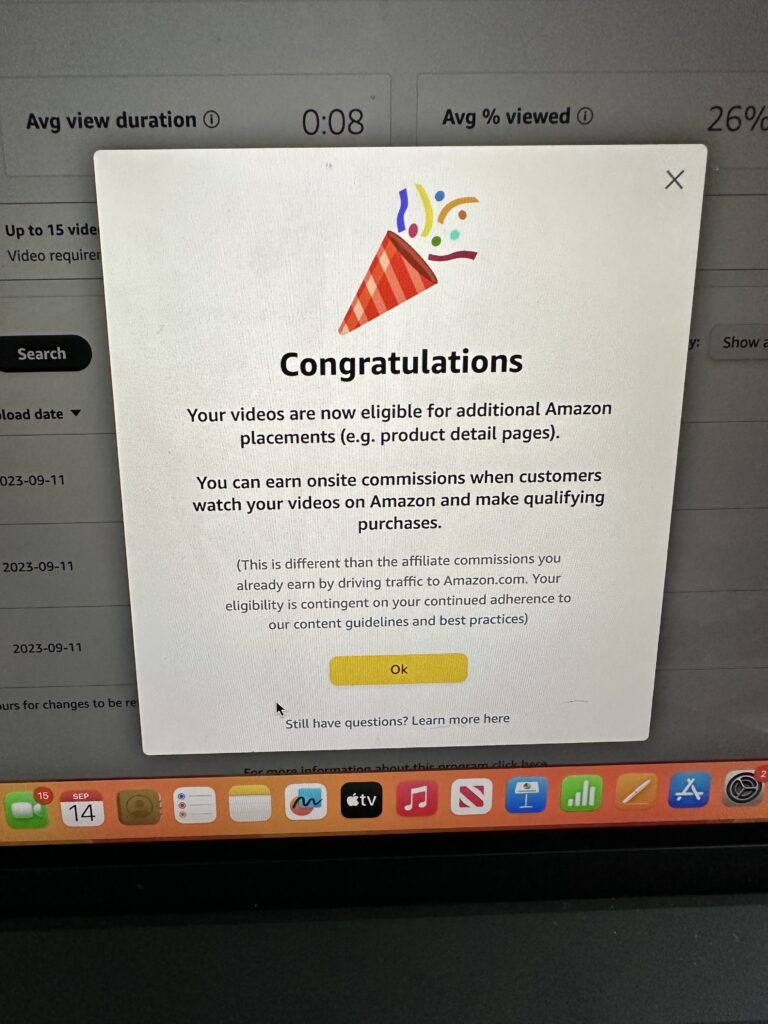
You’ve probably heard creators talk about “Amazon Reviews” that make them thousands every month. But let me clarify something:
🛑 These are not traditional reviews.
✅ They are short, shoppable video demos and reviews placed on actual Amazon product pages.
How It Works
If someone watches your video on a product page and then buys the product, you earn a commission—even if they didn’t click your link or know who you are. It’s passive and powerful if you get accepted.
How to Qualify
You’ll need to:
- Be part of the Amazon Influencer program (not just Associates)
- Have a storefront
- Upload three product videos following Amazon’s guidelines
✅ Keep the videos short, informative, well-lit, and shot vertically.
✅ No health claims, no copyrighted music, and no cluttered backgrounds.
Then wait. Don’t upload anything else until you hear back.
My Experience
I did all of the above and was accepted—but I’ll be honest, this method didn’t end up working for me. And to be brutally honest, I didn’t try THAT hard to make it work. I was finding success in the realm of affiliate links and collaborations that I didn’t have the time to dedicate to these videos.
That doesn’t mean it won’t work for you. I know some creators who are earning a steady passive income with it. I just didn’t see the ROI personally, but I’m glad I tried it and learned the process. I also still have the ability to be shown on product pages. So if I do happen to upload content that gets placed, I can earn some money!
5. Blogging
I won’t go super in-depth here, because I already have a full How to Start a Blog post you can check out—but I wanted to give you the basics.
Is Blogging Still Worth It?
Absolutely. Blogging is not dead. Every time someone Googles a “how to,” a recipe, or a product review, guess where they land? A blog.
It’s a slower burn compared to social media, but it’s longer-lasting and more sustainable. Some of my posts bring in traffic (and income) months or even years later.
How Do You Make Money with a Blog?
- Ad revenue (from platforms like Mediavine or Google AdSense)
- Affiliate links (like the ones I shared above)
- Sponsored posts (brands paying you to publish a post)
What’s the Startup Cost?
It depends on your setup, but expect somewhere between $100–$400 to get started, depending on your host and whether you start an email list right away.
How Long Until You See Income?
This depends on:
- How often you post
- If you’re sharing content people are searching for
- How you drive traffic (spoiler alert: Pinterest is my biggest driver)
I personally got ad placement and started earning within 6 months of launching my blog by focusing on Pinterest traffic.
6. Digital & Physical Products
Let me be crystal clear:
I am not talking about course reselling or MLMs.
There are so many other ways to sell meaningful, useful things online, both physical and digital.
What’s a Digital Product?
Something you create once and sell over and over again.
Think:
- Printable worksheets
- Recipe books
- SVG files
- Toddler activity ebooks (👋🏼 I made one!)
What’s a Physical Product?
Something you make and ship to your customer. For me, that used to be headbands and scrunchies. It was fun, but not sustainable with three kids under four.
Where Can You Sell?
- Etsy (great for beginners)
- Shopify or Stan Store (if you have traffic/followers)
- Beacons or your own blog (especially if you’re already sharing content)
Startup Cost?
It varies widely:
- Digital products: very low—mainly your time and design tools
- Physical products: depends on materials, shipping, and selling platform
I’ve used both Etsy and Shopify and they each have pros and cons. If you’re just starting out, Etsy is probably your best bet to build momentum and get eyes on your site!
7. Pinterest: My Secret Weapon
Pinterest is the silent powerhouse of everything I do.
If you take away just one thing from this post: use Pinterest to support whichever income stream you pick.
Why Pinterest Works
- Pins can live for weeks, months—even years
- Great for evergreen content (like gifts, parenting hacks, DIYs)
- It takes longer to see traction (4–6 weeks), but the payoff is big
- You don’t need a huge following—just valuable, searchable content
How I Use Pinterest
I use it to drive traffic to:
- My blog posts (which have affiliate links + ads)
- LTK posts or Mavely collections
- Product roundups and gift guides
Just always be sure you disclose if a pin links to affiliate content. FTC guidelines apply here, too!
When to Start Posting?
Way earlier than you think. Pinterest is a search engine, not a social media app. So if it’s July? I’m already pinning fall and holiday content.
What Kind of Pins Work?
- Gift guides
- Collages (Canva is great for this!)
- Seasonal content
- Tutorials and how-tos
- Printable resources or product roundups
To make my life easier and help me be consistent (because consistency is key in all of these endeavors), I have a set of Pinterest Pin Templates on my Canva that I switch up for my various blogs. This makes it so much easier than trying to create a new pin from scratch each time!
My Biggest Pinterest Mistake (So You Don’t Make It)
Okay… this is embarrassing, but let me be honest. I don’t want you to make the same mistake I did starting out!
In my early days, I followed bad advice from a course that promised fast money using Pinterest. The “strategy”? Take Amazon images, copy the description, and link your affiliate tag.
It was so against the rules. I didn’t know better at the time, but it got my Pinterest account flagged for spam and copyright, and I had to start a brand new one from scratch.
Lesson learned: Pinterest is not a shortcut or a quick hack. It takes real effort, thoughtful content, and consistency. But it’s 100% worth it.
Helpful Tools I Use
- Canva: I use Canva for all my pins, collages, and blog graphics. I have a handful of Pinterest templates that I reuse and tweak.
- LinkDM: This is how I send links automatically in Instagram comments (“Comment SAHM and I’ll send you the link!”). Free to start, easy to use.
Final Thoughts + My Two Biggest Tips
- It is NOT too late and it is NOT too saturated.
You can absolutely start today and build a meaningful income from your phone. You do not need to go viral or have 100,000 followers to earn money. - Focus on one thing (plus Pinterest).
Don’t try to do everything at once. Start with one method, learn the ropes, get consistent—and then layer in something new.
I hope this post gave you some clarity and encouragement. If you have questions I didn’t answer here, drop them in the comments or send me a DM on Instagram. I’ll always be honest with you about what’s worked and what hasn’t.
There’s room for all of us in this space.
xx Ciara



1 COMMENT
Whitney Parker
8 months agoThis is so helpful thank you so much!!